University of Nebraska at Omaha logo University of Nebraska at Omaha
REQUEST INFO VISIT APPLY

MY UNO DIRECTORY
REQUEST INFO VISIT APPLY
MY UNO DIRECTORY
  • About Backback to Main menu
    • About
    • Mission and Strategic Plan
    • Leadership
    • Community Engagement
    • Buildings and Maps
    • Parking and Transit
    • Accreditation
    • News
    • Events
  • Admissions Backback to Main menu
    • Admissions
    • Undergraduate Admissions
    • Graduate Admissions
    • Transfer Students
    • Online Admissions
    • International Admissions
    • New Student Resources
    • Cost and Aid
  • Academics Backback to Main menu
    • Academics
    • Majors & Programs
    • Colleges
    • Academic Support
    • Library
    • Class Search
    • Course Catalogs
    • Academic Calendar
    • Advising
  • Student Life Backback to Main menu
    • Student Life
    • Student Leadership and Involvement
    • Spirit and Tradition
    • The Maverick Store
    • Student Housing
    • Campus Dining
    • Campus Recreation & Wellness
    • Health Services
    • Career Services & Internships
    • Student Events
  • Research Backback to Main menu
    • Research
    • Research Support
    • Centers and Institutes
    • Research News
  • Engagement
    Students
    • Student Service and Leadership Collaborative
    • Find Volunteer Opportunities
    • Maverick Food Pantry
    • Voter Information
    • Internship Opportunities
    • Student Resources
    • Become an Engaged Scholar
    Faculty and Staff
    • Faculty Senate
    • Center for Faculty Excellence
    • Staff Advisory Council
    • Faculty Resources
    • Engaged Research
    • Service Learning Academy
    • Community-Based Learning Courses
    Community
    • Campus Resources
    • Service Learning Academy
    • Samuel Bak Museum: The Learning Center
    • Promote Volunteer Opportunities
    • Promote Internship Opportunities
    • Rent Office Space
    • Senior Passport Program
    • Community Engagement Partnership Initiative
    Office of Engagement
    • Office of Engagement
    • Connect to Campus
    • Barbara Weitz Community Engagement Center
    • Service Learning Academy
    • Rent Office Space
    • Samuel Bak Museum: The Learning Center
    • Partner With Us
    • Senior Passport Program
    • Nebraska Business Development Center
    • Community Partners on Campus
    ${cardImgAlt}
    Connect With Us

    Contact the Office of Engagement
  • Athletics
  • Alumni & Giving Backback to Main menu
    • Alumni Association
    • Thompson Center
    • NU Foundation

Change of Program

  1. UNO
  2. Registrar
  3. Faculty & Staff
  4. Training and Tutorials
  5. Change of Program

  • My Advisor Picks
  • PeopleSoft Upgrade
  • TES Training
  • Peoplesoft/SIS Access Requests
  • Degree Works Information
  • How to Submit Grades
  • Access Requests
  • Change of Program

UNO Advisors now have an easier way to help students add, change or delete college, major, minor or concentration. The UNO Advising community has an eForm to complete a change of program request.

Change of Program Video Tutorial

How To Use the Change of Program eForm Instructions:

1. MavLINK Staff Page > Change of Major Link in “Staff Messages” Box

2. Click “Change of Major eForm” in modal window

3. Enter the Student NUID to begin working on your student; Click Next
The form will display the student’s name and current program information
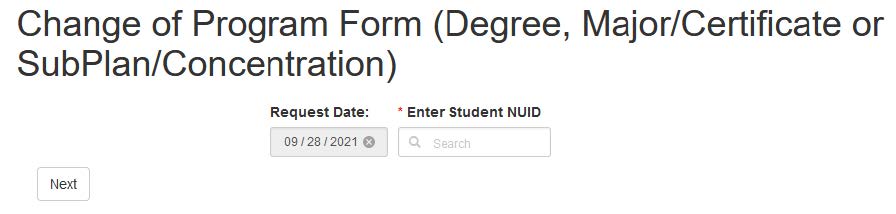
change of program eform screenshot 1

This form will allow you to:
• Add to the student’s existing program
• Remove from the student’s existing program
• Change Catalog Year

4. Select from the following options to move forward in the form: Add, Remove, Change Catalog Year

The options are multi-select, meaning the form can handle multiple options in one submission

change of program eform screenshot 2

Several options have a College/program “workflow” (approver) group/individual to whom they route while others are submitted straight to the Office of the University Registrar for final processing

Making use of the comments box within the form is encouraged


Add

Selecting “Add” will open a menu of options; options are multi-select

In this example, a list of active Additional Majors & Certificates as well as a list of active Minors available to add will populate into the form.
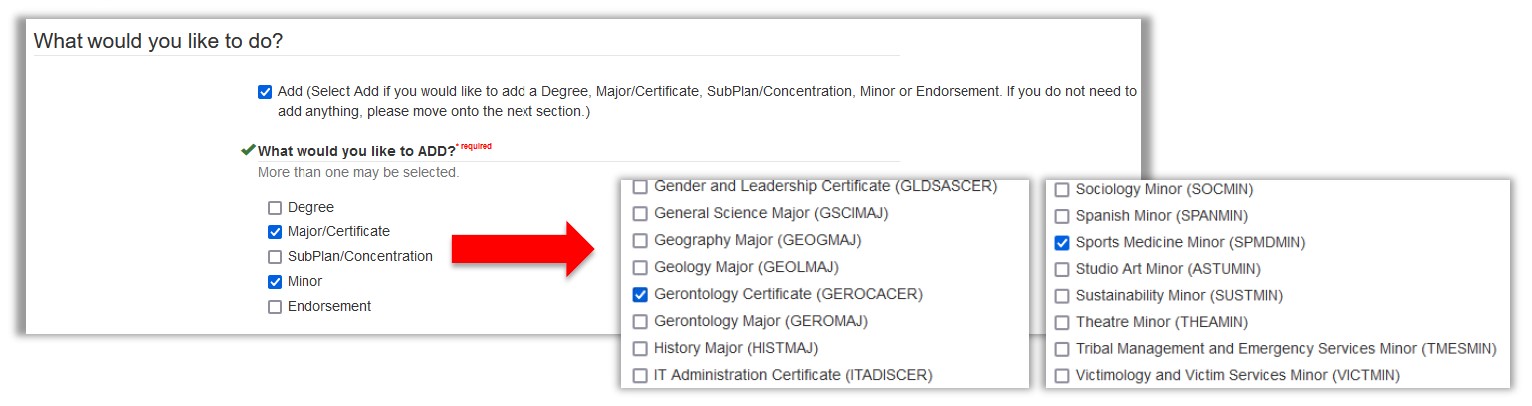
change of program eform screenshot 3

The advisor will click the applicable program(s) to add, free-type any comments and click “Complete” to move the eForm to the next step in the workflow.
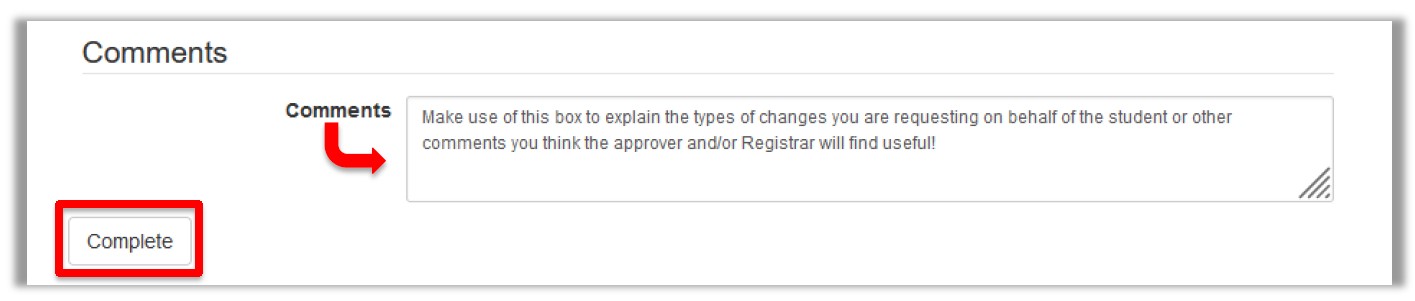
change of program eform screenshot 4


Remove

Selecting “Remove” will open a menu of options; options are multi-select

In this example, a list of the student’s current Majors & Certificates are available for removal.
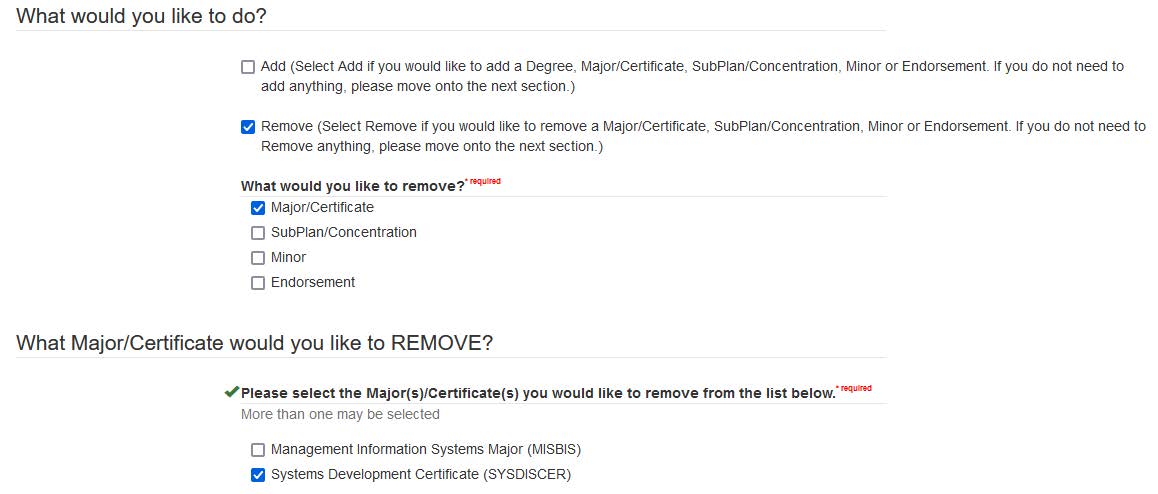
change of program eform screenshot 5


The advisor will click the applicable program(s) to remove, free-type any comments and click “Complete” to move the eForm to the next step in the workflow.

change of program eform screenshot 6


Change Catalog Year

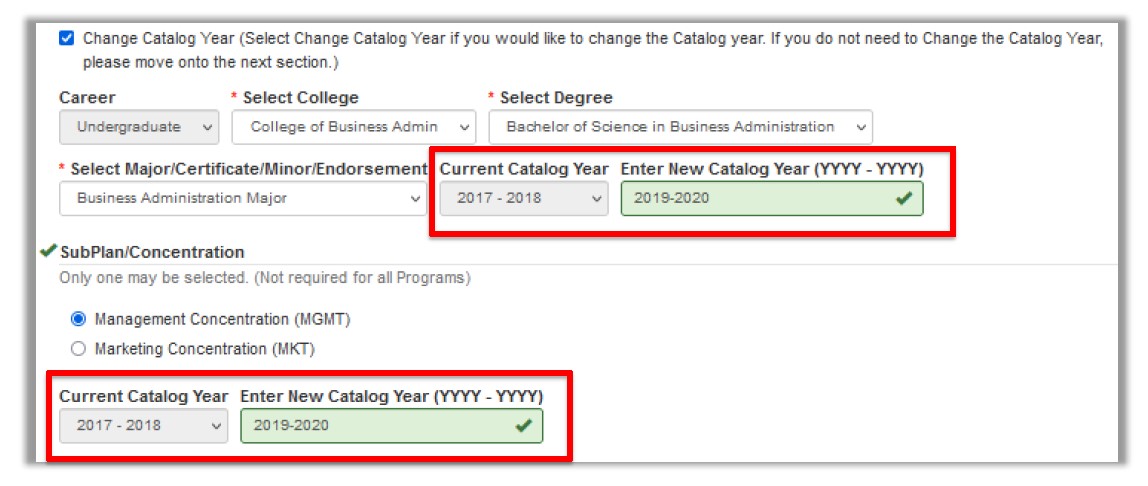
Selecting “Change Catalog Year” will require the user to select the College, the Degree, and the particular Major/Certificate/Minor/Endorsement.

In this example, the major and a subplan/concentration are being changed to a newer catalog year.

Only one subplan/concentration can be selected on the form.
change of program eform screenshot 7

The advisor will click “Complete” to move the eForm to the next step in the workflow.


Workflow

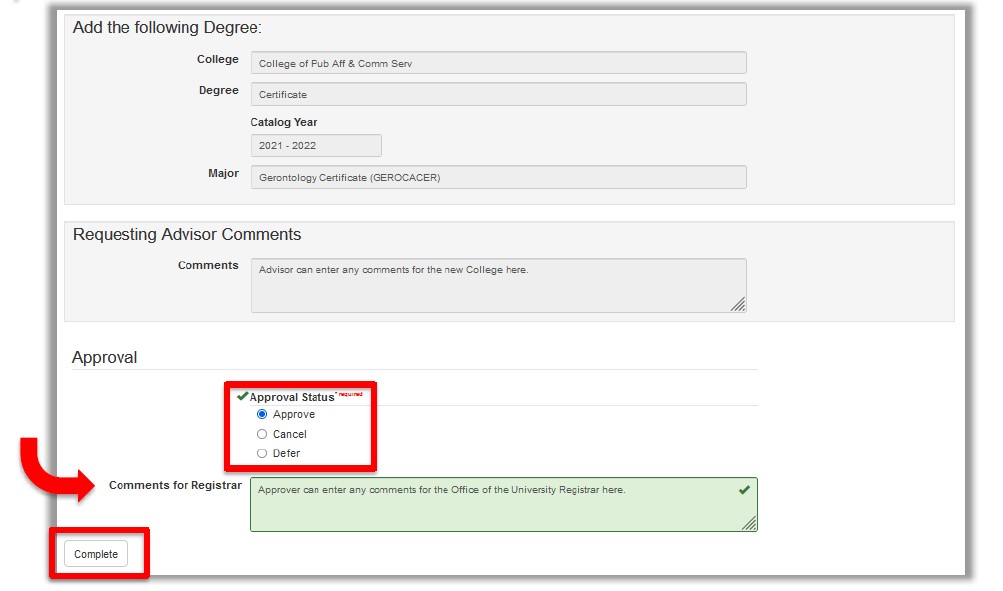
Advisors/staff members assigned as approvers for the Change of Major eForm will use “My Workflow Tasks” in PeopleSoft to approve, deny or defer requests. Comments can be included for the Office of the University Registrar.
change of program eform screenshot 8

Training and Tutorials

  • My Advisor Picks
  • PeopleSoft Upgrade
  • TES Training
  • Peoplesoft/SIS Access Requests
  • Degree Works Information
  • How to Submit Grades
  • Access Requests
  • Change of Program

Additional Resources

  • How to Use Change of Program eForm PDF Instructions

Contact Us

Office of the University Registrar
105 EAB
6001 Dodge Street
Omaha, NE 68182

Phone:  402.554.2314
Fax: 402.554.2011
Email: unoregistrar@unomaha.edu

Facebook: UNO Office of the University Registrar
X (Formerly Twitter): @UNO_Registrar

Staff Directory

Services and Resources

  • Academic Calendar
  • Course Catalogs
  • MavCARD Services
  • MavLINK
  • my.unomaha.edu
  • UNO Brand Guide

Related Links

  • A-Z List
  • Employment
  • University of Nebraska System

Campus Links

  • Accessibility
  • Billing Office
  • Buildings and Maps
  • Campus Directory
  • Campus Safety
  • Events
  • Human Resources
  • Library
  • Military-Connected Resource Center
  • News
  • Registrar

Policies and Reporting

  • Emergency Information Alert
  • MavsReport
  • Notice of Non-Discrimination
  • NU Foundation
  • Privacy Statement
  • University Policies
  1. Privacy Statement
  2. Accessibility
  1. 402.554.2800

University of Nebraska at Omaha
University of Nebraska at Omaha, 6001 Dodge Street, Omaha, NE, 68182
  • ©  

Social Media


Omaha Skyline

Our Campus. Otherwise Known as Omaha.

The University of Nebraska does not discriminate based on race, color, ethnicity, national origin, sex, pregnancy, sexual orientation, gender identity, religion, disability, age, genetic information, veteran status, marital status, and/or political affiliation in its education programs or activities, including admissions and employment. The University prohibits any form of retaliation taken against anyone for reporting discrimination, harassment, or retaliation for otherwise engaging in protected activity. Read the full statement.