

See below a variety of tips and tools to help meet your communications and marketing needs in the College of Arts and Sciences.
The guidance below refers to preferred tools and processes for the College of Arts and Sciences, but other resources can be found at the UNO Marcomm website.
Events
To kick start any event promotion, it must first be submitted via the Localist calendar tool. The other pieces will follow once that submission is made and reviewed. To help market your event, see the following opportunities for support from the CAS Communications Office and necessary lead time for each. These are minimum lead times. Submission to campus newsletters like MavDaily and Bullseye does not guarantee placement.
Localist Calendar
Localist is the university's new tool for sharing and promoting public events. See the main Localist event calendar
Any faculty member, staff, or student can submit a UNO event to the calendar using their NU ID# credentials.
Make sure to select the College of Arts and Sciences as part of the event submission, so the CAS Communications Specialist will be notified to review the submission.
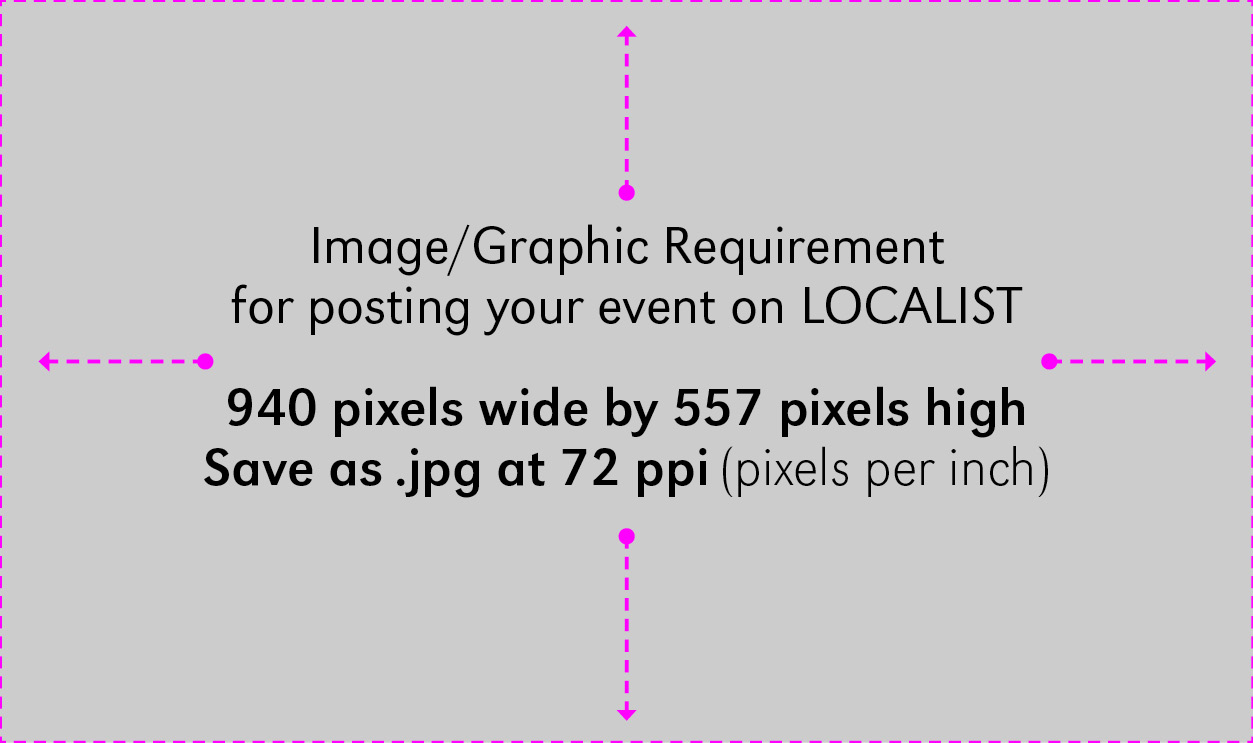
A graphic/image is required for every submission — please don't include text in this image. Below are the specifications to help create your image.
Once your Localist submission is approved, the CAS Communications Specialist will:
- Submit the event, on your behalf, to Marcomm for consideration in MavDaily and/or Bullseye promotions.
- Schedule posts about the event to the CAS social media channels.
- Add the event to email communications as relevant and time allows (based on amount of notice).
*The rest of the options listed above (flier/print materials and paid social ads/boosts) will only be completed on request and if the department or program has budget to pay for these efforts.
Zoom Events
If you're hosting a virtual event via Zoom, you should decide whether you need Meeting or Webinar functionality.
- Zoom Meeting: 300-person capacity, ideal for hosting more interactive sessions where you’ll want to have lots of audience participation or break your session into smaller groups. Schedule these yourself using your UNO Zoom account.
- Zoom Webinar: 500– to 1,000-person capacity, like a virtual lecture hall or auditorium. Webinars are ideal for large audiences or events that are open to the public, and typically, webinar attendees do not interact with one another. The average webinar has one or a few people speaking to an audience. If you need webinar functionality, submit a ticket to ITS and request to have a webinar license temporarily added to your Zoom account. You can create the event as a Zoom meeting at ay time and start collecting registrations, then upgrade the Zoom from a meeting to a webinar once the temporary license is in place. Don't forget: once you upgrade your meeting to a webinar, you need to invite anyone who needs to be seen or heard in the event as a panelist. Otherwise, they will come in as a normal guest and not have permission to turn on their microphones or cameras.
Event Registration
Virtual events: Regardless of if you use a Zoom Meeting or Webinar, it's recommended that you require registration for accessing the event. This adds a layer of security to the Zoom, but also helps with tracking the success of promotional efforts.
In-person events: If the event is free, you can use a tool like Microsoft Forms to collect RSVPs. If you need paid ticketing, you need to reach out to UNO's Business Systems Technology and Cashiering to have them set up a storefront for you.
Design Tool and Templates
Design templates are now available in Canva, an online templating tool for campus partners developing UNO-branded posters, brochures, digital signs, and other print and digital collateral. All UNO approved fonts, colors, logos, etc. are already imported into the tool and make it easy to produce quality materials quickly and stay on brand.
Allow 6-8 weeks for any design/print projects requested of CAS Communications or the central Marcomm team. This time allows for iterations on the design and feedback, as well as a minimum 2-week printing timeline.
CAS Social Media
A great place to start is following our official CAS accounts below.
If you are managing social media accounts for a UNO department or program, make sure you are following the UNO Social Media Policy, especially in terms of content guidelines and frequency of posting. See some quick tips below for making sure your social media content is useful and accessible:
- Tailor content to your target audience, while remembering that institutional accounts should prioritize prospective and current students. Faculty and staff at UNO may be another audience, as well as Omaha community members or colleagues at other academic institutions. Knowing which audience would care about the information helps craft more meaningful content.
- If you use hashtags, all words should be capitalized for accessibility purposes, #LikeThis. It allows screen readers to differentiate words.
- Think of images as purely art. Do not rely on an image (especially graphics with text) to be the sole vehicle for information — posting an image of a flier is insufficient, if you don't also have post text to accompany it. Screen readers cannot capture text embedded in images, so you always have to replicate the information in a photo caption, post text, etc. Some platforms now allow you to add alt-text to describe what the image contains — do this as much as possible.
- Platforms prioritize native content. For example, if you have a video to share, uploading the video file to each platform will reach more people than just sharing a Vimeo or YouTube link on those same channels.
If you're interested in using the HubSpot tool for social media management and publishing, check out upcoming trainings to get access. HubSpot can also be used for email marketing (details below).
Email Marketing
The College of Arts and Sciences has a few regular email newsletters, created using the HubSpot tool:
- The CAS Monthly newsletter tends to go out on third Wednesdays of the month and is sent to all CAS faculty, staff, students, and alumni, as timing allows. This email includes feature stories, events, and media mentions. The student version may include opportunities (career fairs, student jobs, info sessions, open houses) specific to that audience.
- The Weekly Update sent from Dean Bloom goes out every Friday to CAS faculty and staff. This email includes any internal updates, shoutouts + good news, campus opportunities and deadlines, and events on the horizon for the following week.
- The Events Roundup email is only sent as needed, primarily when the volume of CAS events is too great for a single month's newsletter (typically occurs in March and October). Depending on the events and intended audiences, this email could be sent to faculty, staff, students, and/or alumni.
Emails from Departments or Programs
If you'd like to use the HubSpot email tool to either send your own internal department newsletter, reach current students in your major, or communicate with prospective students, please reach out to Courtni Kopietz for a consultation. Different approaches are available depending on your needs:
- If you'd like to send emails less frequently, such as on a semesterly or annual basis, you can share content with CAS Communications and they will prepare the email and send on your behalf. Allow at least 2 weeks for the email to be built and sent.
- If you'd like to send emails monthly or more frequently, you can be trained on the email platform to build and send emails yourself. Email templates are available for ease of use, and email lists could be maintained within HubSpot directly.
Points to consider:
- You can only email natural constituents or those who have explicitly opted in to receive your emails. For example, a department could send emails to current majors, faculty and staff in the department, or people who may have opted into communications through an event registration or a program interest form.
- If you'd like to email alumni, the Alumni Association has to facilitate the process and owns the rights to those lists. We create the content in HubSpot, and then they send it on our behalf using their own email system.
- HubSpot is a marketing tool. This means people can opt-out at any time (even UNO students, employees, etc.) so it's best used for news and promotional content that people will engage with and contributes to relationship and culture building. It will never replace Outlook for general business communications and should not be used for emails that require many replies or discussion threads.
News and Feature Stories
Every story we write should have a target audience in mind as well as contain some of the features of a great story. Does it capture attention or make a personal connection with a certain audience? Does it teach you something or inspire action?
See more information about newsworthiness on the Marcomm site here.
Stories that fit the following categories will be prioritized:
- Student Lifestyle — what about the UNO experience contributes to student success? Examples include successes due to flexible learning options and academic support. What value does the metropolitan experience bring to student engagement and fulfillment?
- University Impact — this includes stories that show how UNO discovers, innovates, and shares knowledge to impact the community. Examples include advances in research, service-learning experiences, and strategic partnerships.
- Career Pathways — how does UNO cultivate talent and contribute to growing the workforce? Examples include stories of paid student internship experiences, alumni achievements, professional development for adult learners, and more.