University of Nebraska at Omaha logo University of Nebraska at Omaha
REQUEST INFO VISIT APPLY

MY UNO DIRECTORY
University of Nebraska at Omaha logo
university of nebraska omaha Office of Strategic Marketing and Communications
REQUEST INFO VISIT APPLY
MY UNO DIRECTORY
  • About Us Backback to Main menu
    • Our Purpose
    • Our Services
    • Awards
    • Our Team
  • Marketing & Brand Backback to Main menu
    • Overview of Marketing
    • Brand Guidelines
    • Writing Style Guide
    • Templates
    • Logos & Marks
    • Fonts & Typesettings
    • Submit for Brand Review
  • Public Relations Backback to Main menu
    • Public Relations at UNO
    • What is Newsworthy?
    • News Center Editorial Standards
    • News Center
    • UNO Events
    • Submit a News or Event Item for Consideration
    • Digital Signage
    • Submission Guidelines for the Maverick Daily and Bullseye
    • UNO Experts
  • Photo and Video Backback to Main menu
    • Overview of Photography & Videography
    • Headshots
    • Photo Guidelines and Policies
    • Release Forms and Permissions
    • Request Access to Photo Archive
    • Freelance Photographers and Videographers
    • Request Photo Services
  • Event Management Backback to Main menu
    • Overview of Event Planning & Management
    • Event Planning Resources
    • Event Planning FAQ
  • Digital and Social Backback to Main menu
    • Overview of Digital and Social Media at UNO
    • Request Digital Services
    • Sign Up for UNO Newsletters
    • Social @ UNO
    • Website
    • Short URLs (Vanity URLs)
  • Resources Backback to Main menu
    • Start Your Project
    • Trainings
    • Toolkit
    • UNO Licensed Vendors
    • Printing Services
    • Contact Us
    • Policies
    • Casting Call: Tell Us Your UNO Story

Shared Blocks

  1. UNO
  2. Office of Strategic Marketing and Communications
  3. Web Resources
  4. Shared Blocks

Shared blocks can be used when you have the same content that needs to be displayed in multiple places. Using a shared block allows users to update multiple pages in one place.

The two available sidebars are Features and Additional Resources. These blocks are currently available for use on the following templates, Standard Page and Services Page.

If this is your first shared block, you must create a folder to house all your shared blocks.


How to Create Shared Blocks

Use the Add Content section to create a new "Shared Block."
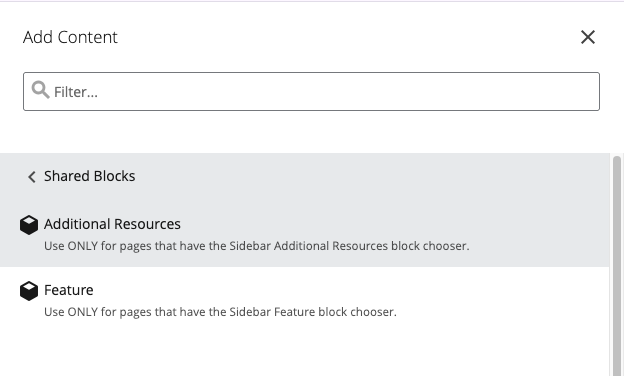
add-content-shared-blocks screenshot.

  • Choose either Feature or Additional Resources.
  • Complete the fields
  • Click Submit to create the block

Connecting a Shared Block to a Standard Page

In the Sidebar section of the template, use the chooser to select the sidebar you created.

If you created a Feature, use the Sidebar >> Feature >> Shared Block >> Select your block from recent or navigate to where yousaved it.
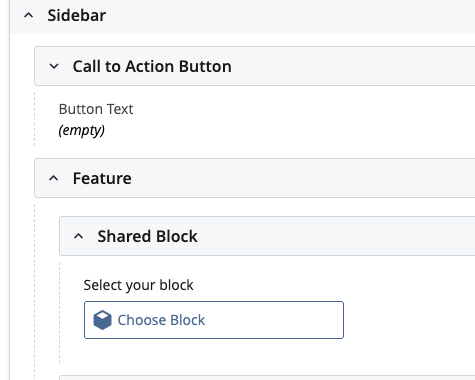
sidebar-feature-shared-block screenshot.

If you created Additional Resources, click the dropdown arrow to the left of Shared Block

Choose the block you created
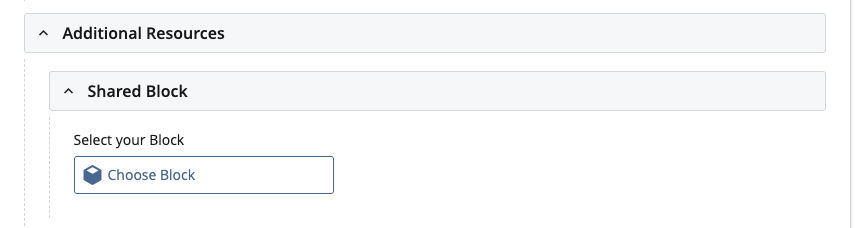
additional-resources-shared screenshot.

Publish all the associated pages with the block to see the changes on the live site.

pink square with icon of block screenshot.

Save time. Create a block.

Creating a block is a great option if you have a list of links that need to go on many different pages.

You'll only have to add one block to a page, instead of a lot of different links to a page.

Contact Us

  • Office of Strategic Marketing and Communications
  • 102 Eppley Administration Building
  • 6001 Dodge Street, Omaha, NE 68182

  • General Email: marcomm@unomaha.edu
  • Media Relations: unonews@unomaha.edu

  • Phone: 402.554.2358

  • Meet the Team

Office of Strategic Marketing and Communications

  • 102 Eppley Administration Building
  • 6001 Dodge Street, Omaha, NE 68182
  • 402.554.2358
  • marcomm@unomaha.edu

Services and Resources

  • Academic Calendar
  • Course Catalogs
  • MavCARD Services
  • MavLINK
  • my.unomaha.edu
  • UNO Brand Guide

Related Links

  • A-Z List
  • Employment
  • University of Nebraska System

Campus Links

  • Accessibility
  • Billing Office
  • Buildings and Maps
  • Campus Directory
  • Campus Safety
  • Events
  • Human Resources
  • Library
  • Military-Connected Resource Center
  • News
  • Registrar

Policies and Reporting

  • Emergency Information Alert
  • MavsReport
  • Notice of Non-Discrimination
  • NU Foundation
  • Privacy Statement
  • University Policies
  1. Privacy Statement
  2. Accessibility
  1. 402.554.2800

University of Nebraska at Omaha
University of Nebraska at Omaha, 6001 Dodge Street, Omaha, NE, 68182
  • ©  

Social Media


Omaha Skyline

Our Campus. Otherwise Known as Omaha.

The University of Nebraska does not discriminate based on race, color, ethnicity, national origin, sex, pregnancy, sexual orientation, gender identity, religion, disability, age, genetic information, veteran status, marital status, and/or political affiliation in its education programs or activities, including admissions and employment. The University prohibits any form of retaliation taken against anyone for reporting discrimination, harassment, or retaliation for otherwise engaging in protected activity. Read the full statement.